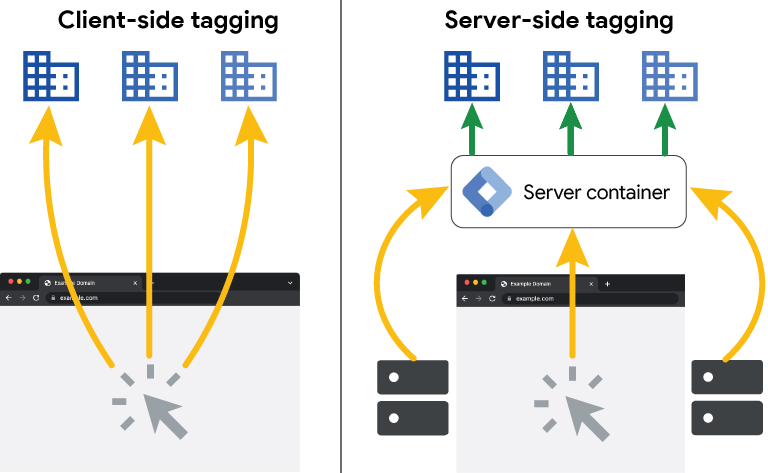
Personal sGTM and Google Tag Gateway for Advertisers Shenanigans
Preface: this post is just a personal note, not an implementation guide.
I’ve been ringing the bell for Google Tag Gateway for Advertisers for some time, excited about the possibility of addressing the ITP issue in iOS without much technical investment. That was until our tech team gently corrected me: even though cookies are set first-party with Google Tag Gateway, ITP recognizes when a cookie is set by a client-side script rather than directly by the server. So… it didn’t quite do what I hoped it would do.
I had Google Tag Gateway running on this blog for a few months before I decided I’d had enough. Knowing that the only real way to tackle these ITP constraints was server-side, I deployed a basic server-side GTM implementation on Google Cloud Run.
The first question that came to mind: will this cost any money? I don’t have massive traffic here, so hopefully I wouldn’t incur noticeable costs.
So, after all the initial trial and error, I started double-tracking into two separate GA4 properties—one client-side (via Tag Gateway) and one server-side. Let’s see how that goes.
Edit October 14, 2025
I’ll readily admit that I had been relying too much on engineers to remember some of the finer implementation details:
- Changing the trigger in sGTM from
page_viewto custom events (which is why enhanced measurement wasn’t recording initially). - Adding the API secret to the client tag.
- Adjusting preview settings within sGTM.
- For Tag Gateway, forcing preview mode via Tag Assistant.
Little things that make the big things work.
Follow-up (October 2026): What 60 Days of Concurrent Data Revealed
A few months after the initial setup, I decided to turn this experiment into a proper long-term comparison. I added a third contender: Stape, a managed hosting platform for sGTM.
From January 1 to February 28, 2026 (60 continuous days), all three architectures ran concurrently on this blog, triple-tracking every hit into dedicated, isolated GA4 properties:
- Client-Side (Google Tag Gateway proxied through Cloudflare)
- Cloud Run sGTM (Self-hosted container on GCP)
- Stape Managed sGTM (Turnkey container hosting)
While this is my personal blog, the data produced clear strategic insights that anyone managing an analytics or MarTech stack should consider.
1. The Volume Reality: Client-Side Has a ~30% Blind Spot
| Metric | Client-Side (Tag Gateway) | Cloud Run sGTM | Stape Managed sGTM | Lift (Server vs. Client) |
|---|---|---|---|---|
| Active Users | 1,246 | 1,609 | 1,609 | +29.1% |
| Sessions | 1,270 | 1,649 | 1,686 | +29.8% to +32.8% |
| Total Events | 4,535 | 5,777 | 5,694 | +27.4% to +25.6% |
| Engagement Rate | 6.30% | 3.15% | 1.42% | Client-side skewed higher |
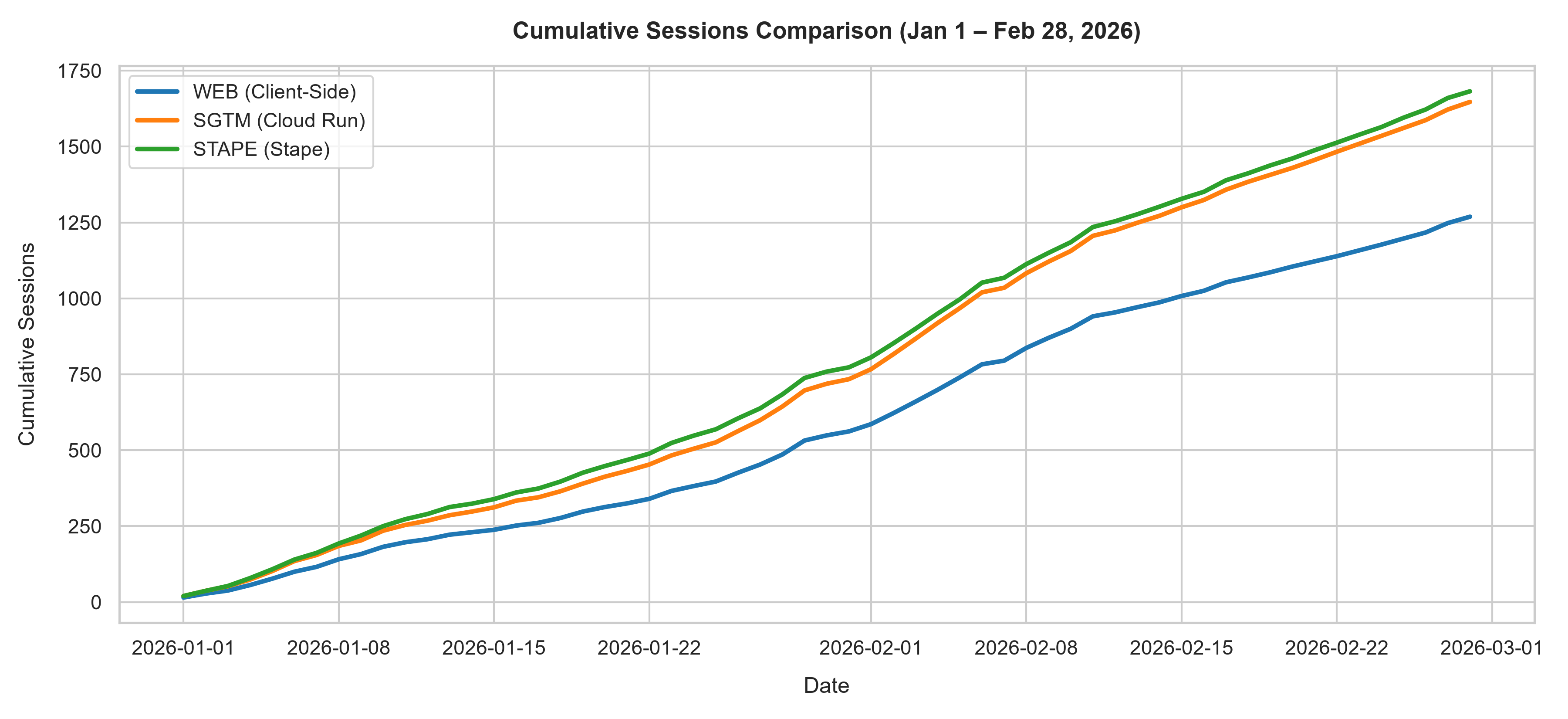
Notice that Cloud Run and Stape recorded the exact same active user count: 1,609. That proves the lift isn’t a vendor quirk; it is the true volume reaching the server layer.
The Strategic Takeaway: If your media mix models, acquisition reporting, and CAC calculations rely strictly on browser GA4, your top-of-funnel denominator is understated by roughly 30%. When client-side tags miss nearly a third of your visitors, your reported cost-per-acquisition is artificially inflated.
2. The Survivorship Bias & The Scroll Setting Nuance
Looking at individual events revealed two major patterns:
| Event Name | Client-Side | Cloud Run sGTM | Stape sGTM | Difference |
|---|---|---|---|---|
page_view |
1,315 | 1,536 | 1,546 | +17.5% |
session_start |
1,265 | 1,497 | 1,499 | +18.4% |
scroll |
553 | 1,259 | 1,266 | +128.0% |
user_engagement |
127 | 110 | 107 | -15.7% |
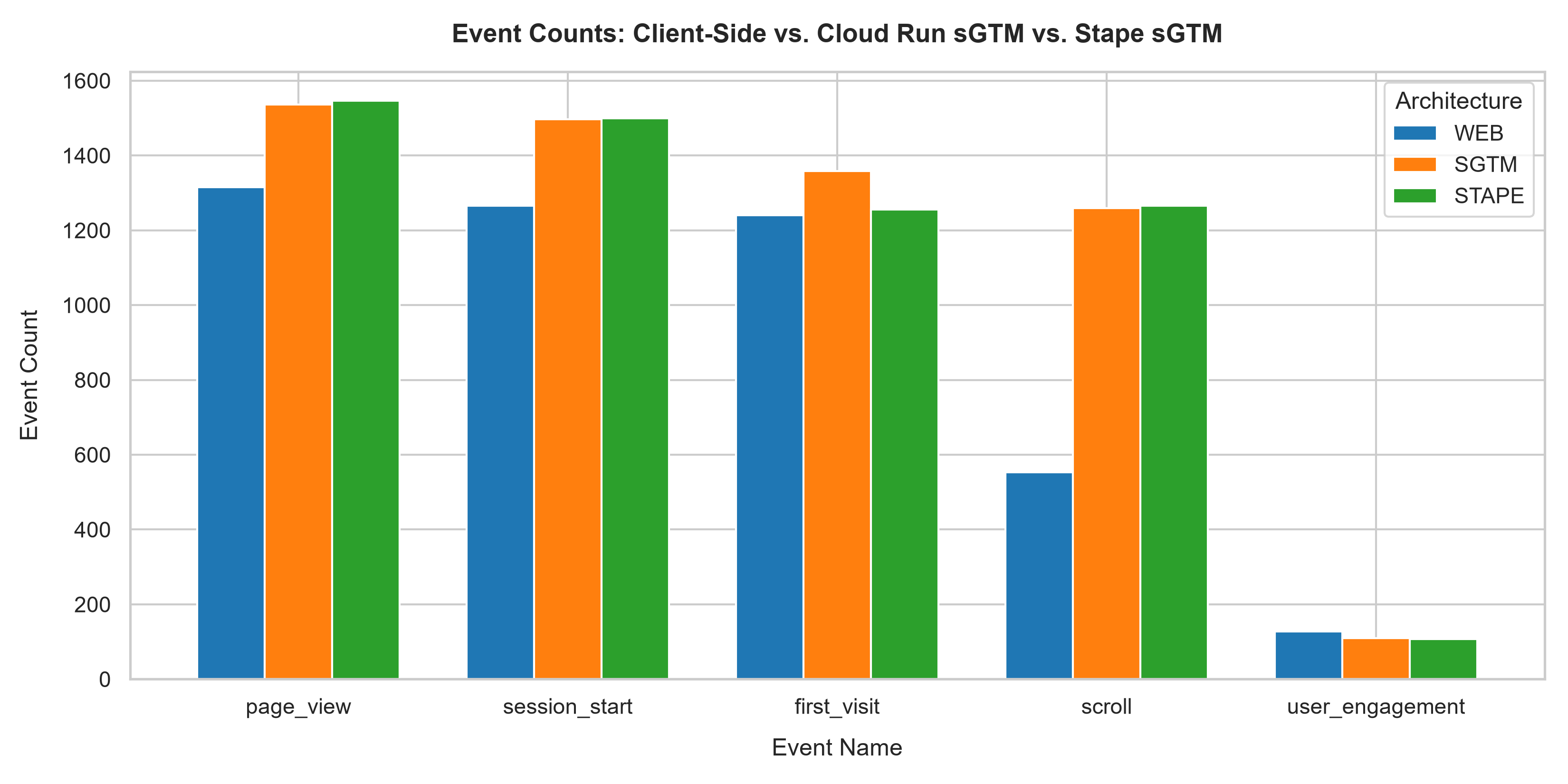
Two takeaways here:
- Client-Side Engagement Rates Lie: Client-side reported a 6.30% engagement rate, while server-side hovered between 1.4% and 3.1%. Client-side suffers from classic survivorship bias: visitors who bounce instantly or leave before the JavaScript executes never make it into the denominator. Server-side logs hits at the boundary, capturing the quick bounces and bot scans that client-side tags miss.
- The Scroll Disparity (+128%): While server-side endpoints naturally capture exit interactions that browsers drop on page unload, there is an important caveat here: I likely had different trigger threshold settings for scroll depth between the client-side enhanced measurement and the server container. I would dare say never attribute a 2x metric jump solely to technical data recovery without verifying tag configuration parity first.
3. The Proxy Trap: Turning China into Singapore
The most eye-opening finding was geographic attribution:
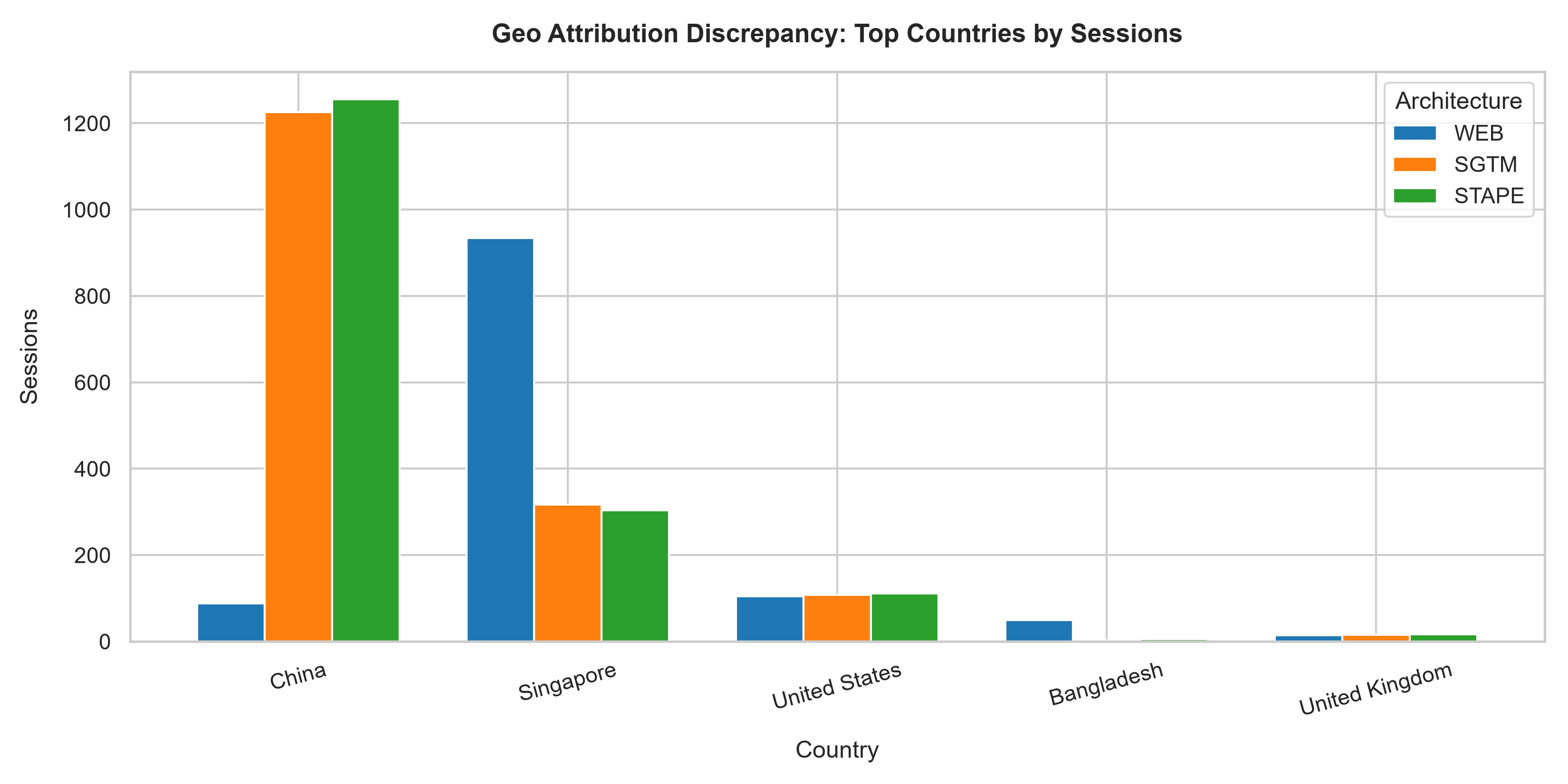
- Client-Side (Tag Gateway): Reported 934 sessions from Singapore, only 88 from China, and 1,146 sessions with city as
(not set). - Server-Side (Cloud Run & Stape): Reported over 1,220 sessions from China (with 1,130+ mapped to Lanzhou) and only ~310 from Singapore.
What happened?
When routing Google Tag Gateway through a CDN reverse proxy (Cloudflare), Google Analytics couldn’t resolve the forwarded client IP, so it attributed sessions to the proxy egress hub (Singapore). In contrast, the sGTM containers forwarded the true client IP (CF-Connecting-IP / _uip), allowing GeoIP to pinpoint the real origin in China (defaulting to Lanzhou, the geographic center used for unresolved Chinese IPs).
Warning: Many teams promote reverse proxies as a simple fix for ad-blockers. But if your proxy strips or mismanages client IP headers, your geographic reporting will silently corrupt. Making ad-spend or localization decisions on proxy hub locations is a dangerous trap.
4. Cost and Maintenance: The TCO Reality
To answer my original question: did it cost money?
Yes. Even with modest personal blog traffic, Google Cloud Run billed between $4 and $6 each month (driven by minimum instance idle time, egress, and logging). While $5/month is trivial in an enterprise context, paying $60/year to track a personal blog felt unnecessary.
More importantly, the maintenance was bothersome. Keeping Cloud Run updated meant tracking Google’s container release digests, pulling images, and redeploying revisions manually. Unless you have automated CI/CD and dedicated DevOps, running self-hosted sGTM is ongoing operational friction.
| Strategic Factor | Cloud Run sGTM (Self-Hosted) | Stape Managed sGTM | Cloudflare Workers / Edge |
|---|---|---|---|
| Monthly Cost | $4 – $6 / mo | $0 (Free up to 10k hits) | Near $0 (Pay-per-request) |
| Maintenance | High (Manual container image updates) | Zero (Automated updates & SSL) | Low (Edge code scripts) |
| Governance | Highest (Private GCP perimeter) | Third-party managed | Distributed edge |
| Best Fit | Enterprises with dedicated DevOps | Personal blogs, SMBs & lean teams | Modern edge-first architectures |
For this site, Stape was the clear winner: identical data quality, zero cost, and zero maintenance headaches. And for anyone looking to scale beyond free tiers without managing Docker containers, edge compute like Cloudflare Workers is the natural next step.
Summary Checklist
- Expect up to ~30% volume recovery: Every setup is different, but I was surprised to see this lift. Server-side genuinely captures lost top-of-funnel traffic, which impacts CAC and attribution models.
- Beware of flattered client-side engagement: Don’t be surprised when server-side lowers your engagement rate; it is reflecting reality, not worse user behavior.
- Audit reverse proxies immediately: Ensure client IP passthrough is verified end-to-end to avoid corrupting geographic data.
- Don’t self-host unless you have DevOps: If you don’t need strict enterprise VPC boundaries, use managed platforms or edge workers to avoid container maintenance drag.